Resolve Free 21.1 scripts missing? What still works, AI tools included
DaVinci Resolve · · 9 sources
Short answer
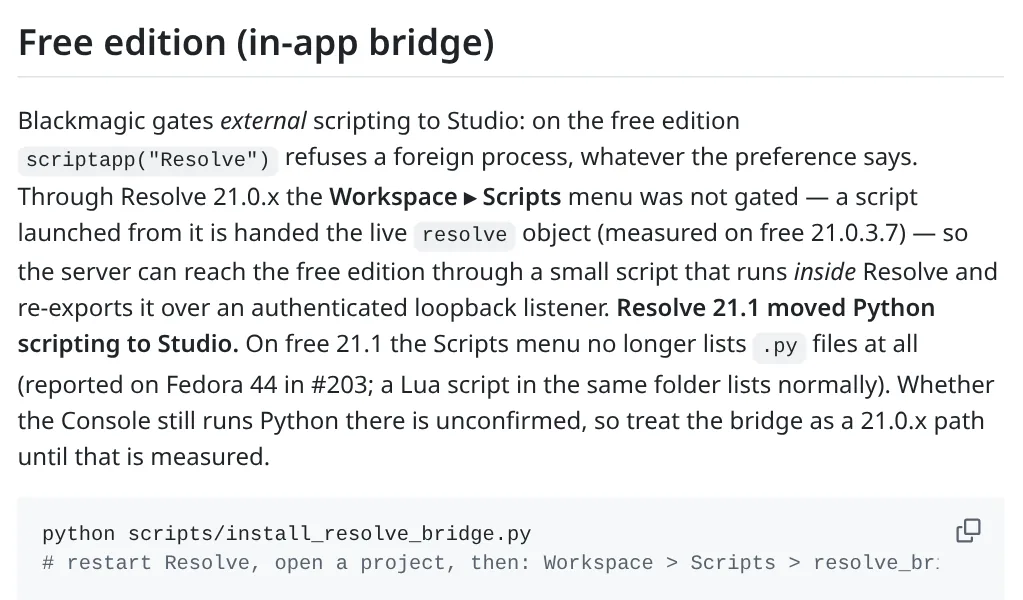
Your scripts aren't broken. DaVinci Resolve 21.1 moved Python scripting to the paid Studio edition, so on Resolve Free 21.1 the Workspace > Scripts menu simply stops listing .py files, with no warning and no error [1][2][3]. Reinstalling Python won't bring them back
You have five real options: stay on Free 21.0.4, buy Studio ($295 one time), move small jobs to Lua, let an AI agent build timelines as files you import, or do the heavy work outside Resolve with FFmpeg tools. Details and a comparison table are below
What changed in 21.1
Blackmagic released Resolve 21.1 at IBC on 8 September 2026 [2]. Buried in the free edition release notes is this line, quoted by CineD, ProVideo Coalition and Puget Systems: "We have moved the ability to script in Python to the Studio version. The Python API was being used to hack studio features into the free version. DaVinci Resolve relies on studio license sales to pay for the engineering team" [1][4][5]
Here's what that means in practice
- Python scripts no longer run on Resolve Free 21.1. The Scripts menu ignores
.pyfiles completely [2][3] - Python 2 support is gone from both editions [1]
- Driving Resolve from an outside program (external scripting) was already Studio only before 21.1, and still is [3][6]
- The new built in MCP server that lets Claude, Claude Code and ChatGPT Codex control Resolve is Studio only too [1]
- Puget Systems confirmed its Puget Bench for Resolve can't run on Free 21.1 anymore because it depends on scripting [5]
On r/davinciresolve the first answer to "did 21.1 break external scripts?" was simply "Yes. It's a studio only feature now" [7]. If your caption, rename or render helper vanished after updating, this is why
How to confirm it's this and not something else
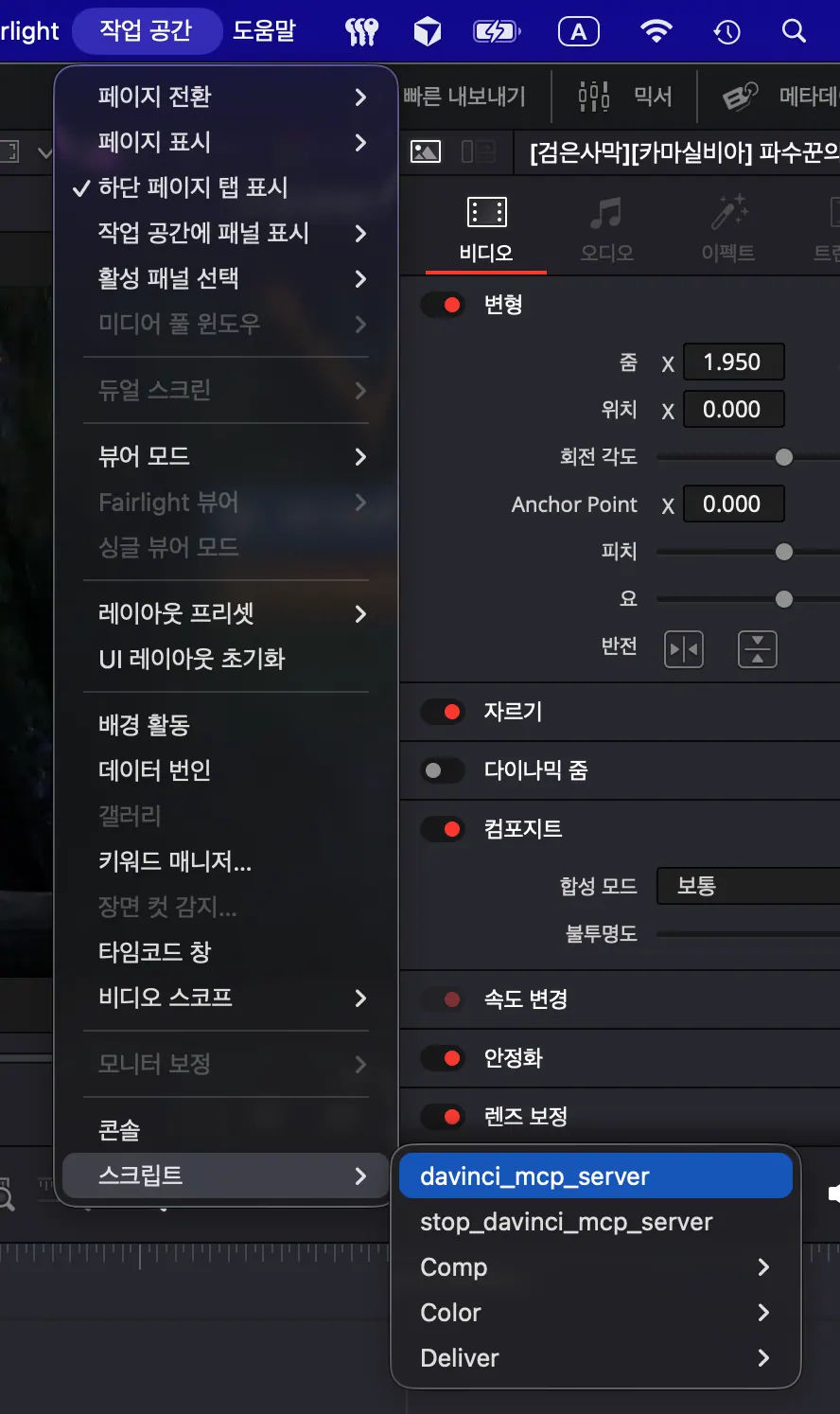
- Open About DaVinci Resolve (in the DaVinci Resolve menu on a Mac, or the Help menu on Windows) and check that it says 21.1 and not Studio
- Open the scripts folder from Workspace > Scripts and check your
.pyfiles are still there - Drop any small
.luascript into the same folder and restart Resolve. If the Lua script shows up in the menu and your Python ones don't, you've hit the 21.1 change, not a path problem [3]
Your options compared
| Option | Works on Free 21.1 | Cost | Good for | Catch |
|---|---|---|---|---|
| Stay on or go back to Free 21.0.4 | Yes, old Python scripts and free bridges keep working | Free | Editors who depend on one script today | You stop getting updates, and you need a separate backed up project library [2] |
| Upgrade to Resolve Studio | Everything, plus the built in MCP server | $295 one time [1][4] | Anyone automating client work | Upfront cost |
| Rewrite small jobs in Lua | Partly | Free | Headless timeline and render tasks | No file access, no external programs, no dialogs, no console output, per one hands on test [2] |
| Let an AI agent write FCPXML, OTIO or LUT files you import | Yes | Free tools exist | Rough cuts, beat cuts, selects, looks | Not live, you import each result by hand [6][8] |
| Do the work outside Resolve with FFmpeg agents | Yes, Resolve isn't involved | Free tools exist | Captions, silence removal, reframing, batch exports | Finishing still happens in Resolve |
Option 1: stay on Resolve Free 21.0.4
Jérémy at xeremy, who sells Resolve plugins, says 21.0.4 is the last free version that still loads Python utilities, and one of his users confirmed it with a clean A/B test on the same machine [2]. The most starred open source Resolve MCP server on GitHub, samuelgursky's, also describes its free edition bridge as a 21.0.x path now [3]
Before you roll back, protect your projects
- Back up your project library first, and export important projects as
.drpfiles or archives as.dra[2] - Don't point 21.0.4 at a library that 21.1 already upgraded. CineD warns that projects opened in 21.1 won't open in older versions, and xeremy says the library upgrade can't be undone [1][2]
- If you keep both versions, give each its own library [2]
Option 2: Resolve Studio
Studio is still a one time $295 license with no subscription [1][4][5]. It brings back full Python 3 scripting and adds the built in MCP server, so Claude, Claude Code or Codex can organize media, cut highlight edits and batch render from plain language requests [1]. According to Voyager you set it up from File > Setup AI Assistants [8]
CineD's advice is worth repeating: try any AI assistant on a throwaway project before you trust it with client work [1]. Our DaVinci Resolve tools page lists the community MCP servers too, with the edition each one needs
Option 3: rewrite small jobs in Lua
Lua scripts still appear in the Scripts menu on Free 21.1 [2][3]. In a hands on test on Free 21.1.0.17 for macOS, xeremy found that Lua can still add render jobs, append clips to timelines, create bins, work with Fusion comps and read project settings [2]
The same test found the Lua side heavily sandboxed. File reading and writing, running external programs like FFmpeg, loading modules and building dialogs were all blocked, and print() showed nothing in the console [2]. So Lua works for simple headless timeline jobs, not for a full plugin. That's one person's test on one machine, so test your own script before relying on it
Option 4: let an AI agent build the edit as a file
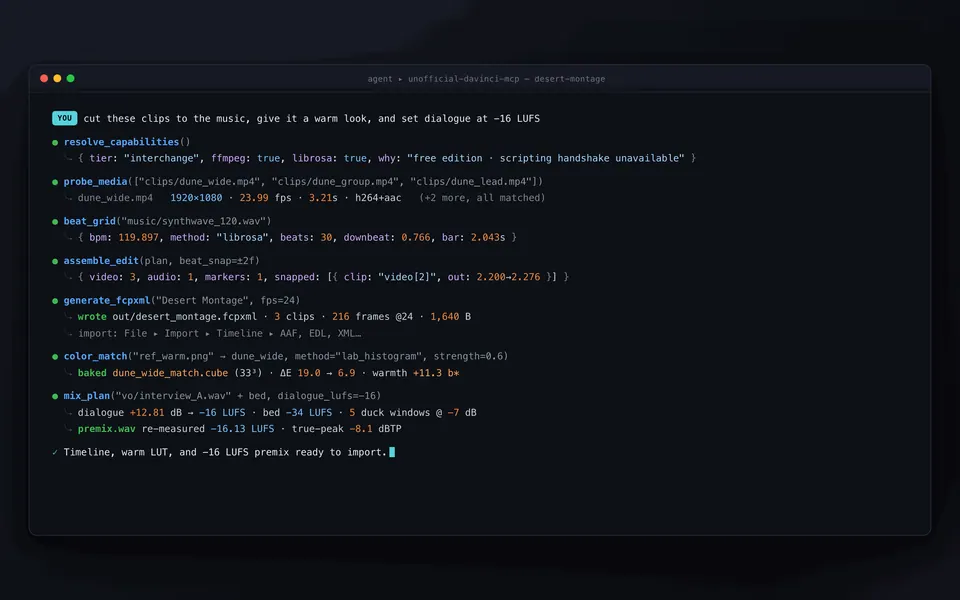
This is the best free route if you want to use Claude or another AI agent with Resolve Free. Instead of controlling Resolve live, the agent writes a timeline file and you bring it in with File > Import > Timeline, which accepts FCPXML and OTIO [6]
Wasserman's Unofficial DaVinci MCP is built for exactly this. On Studio it edits live, and on Free it generates FCPXML and LUT files for beat cuts, dialogue tightening, reference looks and loudness targets. Every change defaults to a dry run you have to confirm [9]
A simple workflow that works today
- Give the agent your clip list, or a transcript made with any transcription tool
- Ask the agent for the cut you want, for example "tighten this interview to 90 seconds and drop the filler"
- Let it write the FCPXML or OTIO file
- Import it in Resolve with File > Import > Timeline and fix anything by hand

Option 5: move the heavy lifting to FFmpeg
A lot of what free scripts used to do, like burning captions, cutting silences, making 9:16 versions or batch exporting, doesn't need Resolve at all. FFmpeg agent tools do it directly on the files and you finish in Resolve
ffmpeg-skill gives an AI agent 42 local FFmpeg tools, including animated captions, 9:16 fit and silence removal, and it avoids passing raw shell strings, which makes it one of the safer options [9]. Compare all of them on our FFmpeg tools page
What the change doesn't touch
The restriction is about scripting only. OpenFX plugins load as normal effects and .drp project templates import as normal projects, so both keep working on Free 21.1 [2]. xeremy's rule of thumb is handy: if installing something meant dropping a file into the Scripts folder, 21.1 broke it on Free. If it was a plugin bundle or a project import, it's fine [2]
FAQ
Why did my DaVinci Resolve scripts disappear after updating to 21.1?
Resolve 21.1 moved Python scripting to Studio. On the free edition the Workspace > Scripts menu no longer lists .py files and shows no error, so it looks like a broken install even though nothing is wrong with your setup [1][2][3]
Will reinstalling Python or fixing my paths bring them back?
No. Your Python setup isn't the problem. Free 21.1 refuses to load Python scripts by design [2]
Can I use Claude or ChatGPT with DaVinci Resolve Free?
Not live on Free 21.1. The built in MCP server and external scripting both need Studio [1][3]. What works on Free is letting the agent generate FCPXML, OTIO or LUT files that you import yourself [6][9]
Does the MCP server built into Resolve 21.1 work on the free version?
No, it's Studio only [1]
Can I rewrite my Python scripts in Lua?
Only simple ones. Lua still runs on Free 21.1 and can edit timelines and queue renders, but in xeremy's test it couldn't read or write files, launch other programs or show a dialog [2]
Is it safe to go back to Resolve Free 21.0.4?
Only with a backup. Export your projects and back up the library before you switch, and don't open a library that 21.1 already upgraded in the older version [1][2]
How much is DaVinci Resolve Studio?
$295, paid once with no subscription, as reported by CineD, ProVideo Coalition and Puget Systems [1][4][5]
Sources
- DaVinci Resolve 21.1 Released, AI Assistant Integration via MCP, Individual HDR Trims, and Python Scripting Moves to Studio by Nino Leitner, CineD, 9 September 2026
- DaVinci Resolve 21.1 Silently Removed Python from the Free Edition: Here Is What Actually Remains by Jérémy, xeremy, 14 September 2026
- davinci-resolve-mcp README, Free edition section by Samuel Gursky, GitHub, checked 17 October 2026
- DaVinci Resolve 21.1 is a huge update by Scott Simmons, ProVideo Coalition
- How DaVinci Resolve Free v21.1 Scripting Changes Affect Puget Bench by Puget Systems, 10 September 2026
- DaVinci Resolve MCP: Official vs Open Source, Free Version by Orkas
- Did DaVinci Resolve (free version) 21.1 break external scripts? on r/davinciresolve, 13 September 2026
- DaVinci Resolve MCP: Studio setup and community servers by Voyager
- AgentCut listings for Wasserman's Unofficial DaVinci MCP and ffmpeg-skill, checked against each GitHub README on 17 October 2026
Spotted something wrong or out of date? Tell me and I'll fix it
The AgentCut weekly
New AI connectors for After Effects, Premiere, Resolve and CapCut, tested setup notes, and what broke after app updates. One email a week.