Clip Match gone in Premiere 27? How to match shots in Color Mode now, plus an AI LUT route
Premiere Pro color · · 14 sources
Short answer
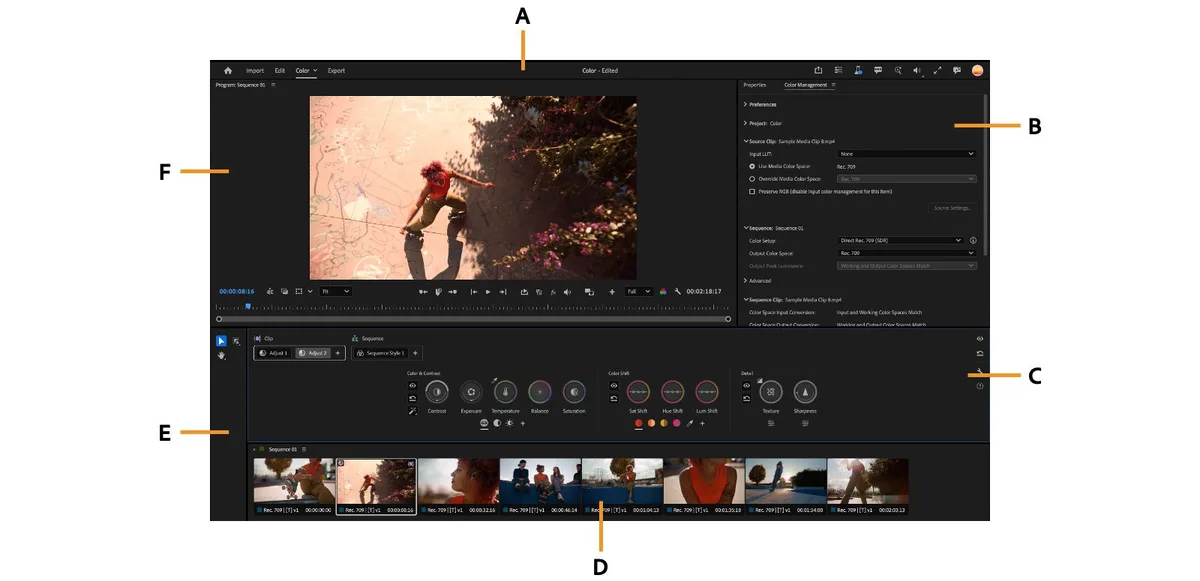
Clip Match is not hiding in a menu. Adobe removed it in Premiere 27.0 together with the Lumetri panel, and the Lumetri Color effect that is left has no match button either [7]. The fastest replacement today is Color Mode: run Auto Color on each shot, then select your reference and the shots to fix in the Clip Grid, turn on Comparison View and match them by eye with the scopes
If you want something closer to the old one click result, an AI agent can do the math for you. Wasserman's free MCP server compares each shot with a reference frame and bakes a matching .cube LUT that you load in Color Mode. And if a client job is due this week, keep 26.x installed and finish it there
What changed this week
Premiere 27.0 shipped in November with Color Mode, a separate grading workspace you open from the Color tab next to Edit [9]. The Lumetri panel is retired. The Lumetri Color effect still exists in the Effects panel and old grades open intact, but you now edit it in the Properties panel or Effect Controls [7][8]
Editors are hitting the gaps right away
- "Why did you remove this color matching feature, which was a fantastic tool for amateur users?" asked u/yiahoo in r/premiere. One reply summed it up: the match was mid, "but mid in one click beats eyeballing scopes for 20 minutes" [1]
- u/JJ-Flip needed to send animators a .cube LUT from 27.0 and couldn't find the export. The answer from u/smushkan: "Not currently possible with the new Color mode unfortunately" [2]
- Another editor used a neutral adjustment layer full of Lumetri effects as a template and asked how to do the same in the new Color panel [3]
- On X, Daniele Pauletto wrote that Color Mode is "COMPLETELY unusable with a pen and tablet" [5]
- A September feature request to keep the Lumetri panel called Color Mode "a joke" [6]
Adobe's own page is plain about it: "The Clip Match feature from Lumetri and the clip Comparison Mode of the Monitor in Edit mode have been removed" [7]
Step 1: open old projects safely
- Before you update, keep 26.x. In the Creative Cloud app, uncheck Remove older versions when you install 27.0, as the r/premiere release thread suggests [4]
- Open a copy of any project that is mid grade, not the original
- Old Lumetri grades still look the same. Leave them alone or tweak them in Properties [8]
- For new projects, Adobe recommends grading in Color Mode without adding Lumetri effects, because mixing both limits what Color Mode can do [7]
Step 2: balance every shot with Auto Color
Matching is much easier when each shot is already neutral
- Click the Color tab, then pick a clip in the Clip Grid
- Put the playhead on a frame that represents the shot
- In the Adjust operation, click Auto Color. Premiere sets Exposure, Temperature and Tint from that frame [10]
- Right click or click and hold Auto Color to run only Auto Exposure or Auto White Balance if one of them goes wrong [10]
Auto Color balances each shot on its own. It does not match cameras, so do the next step too
Step 3: match shots with Comparison View
Comparison View moved from Edit mode into Color Mode [11]
- In the Clip Grid, select the reference clip and the clips you want to fix
- Turn on Comparison View with the button under the monitor. The clip you are adjusting sits on the right and the reference on the left [11]
- Pick other references from the Reference List, then click each clip in the grid and adjust it while you compare [11]
- Use the split on the scopes too. Adobe suggests lining up the top and bottom of the waveform with Contrast and Exposure, and lining up the vectorscope with Temperature or Balance [11]
- For long jobs, drop a Color Reference Marker on your hero frames (Marker > Add Color Reference Marker, or the button in the Color Monitor bar) and pin them to the Reference List [11]
The old Side by Side layout is not back yet. Adobe says it is planned for a future release [11]
Step 4: reuse a look without the adjustment layer trick
Color Mode grades work in levels: Clip, Group and Sequence. A Sequence operation affects every clip in the sequence except excluded tracks, which covers the "one look over everything" job adjustment layers used to do [12]. For one camera or one scene, put those clips in a Custom Group and grade the group once
You can copy and paste a whole grade, one operation or a single control between clips [12]. Match one A cam shot, then paste its operation onto the rest
Step 5: let an AI agent build the match LUT
This is the closest thing to Clip Match right now, and it runs outside Premiere
Wasserman's Unofficial DaVinci MCP is a free, Apache 2.0 MCP server you use from Claude Code, Codex or Cursor. Its color_match tool takes a reference still and the shots you want to match, compares them in CIE Lab and bakes a 33 point .cube LUT for each shot, with a before and after preview strip and a ΔE number so you can see how close it got. The color engines run without Resolve open, so you only need the LUT files [13]
- Export a still of your hero frame with Export Frame
- Install the server per its README. It needs Python 3.10 or newer and ffmpeg, and the README lists macOS and Linux only [13]
- Ask your agent something like "Match a.mov and b.mov to hero.png with color_match and save one LUT per clip. Show me the preview strip first"
- In Color Mode, add a LUT operation to each clip and load its LUT
- Check skin last and pull strength down if it looks heavy. The README's own advice for looks is strength 0.5 to 0.65 and "always re check skin last" [13]
I haven't run this exact combo in Premiere 27.0 yet, so test one clip before you do a whole timeline

Option: ask Premiere's own AI Assistant
Premiere 27.0 also ships an AI Assistant panel [9]. Adobe's FAQ says it can apply color grading, accepts .png and .jpg references and uses Firefly credits [14]. You can try "Match the selected clips to this reference image", but Adobe doesn't describe a match feature, so test it on a duplicate sequence with the permission mode set to ask first [14]
Which route fits your job
| Route | Speed | Cost | Best for | Catch |
|---|---|---|---|---|
| Auto Color + Comparison View | Fast once learned | Included | Interviews, two camera shoots | Manual match by eye |
| Copy and paste grades, Groups | Fast | Included | Many shots from one camera | Needs one matched shot first |
| AI match LUT (Wasserman MCP) | Fast after setup | Free | Many shots to one hero look | macOS or Linux, Python setup |
| Premiere AI Assistant | Unknown | Firefly credits | Trying it on simple scenes | No documented match feature |
| Stay on 26.x | Same as before | Included | Jobs due this week | You miss 27.0 features |
More agent tools for Premiere
Every Premiere bridge we track, like MCP Bridge for Adobe Premiere Pro, is on Premiere Pro MCP. Grading in Resolve instead? See DaVinci Resolve MCP. New to agents? Start with Claude Code for editors
FAQ
Where did Clip Match go in Premiere 27?
It was removed. Adobe's Color Mode page says the Clip Match feature from Lumetri and the Edit mode Comparison Mode are gone. Comparison View now lives in Color Mode, where you match shots yourself [7][11]
Can I still use Lumetri Color in Premiere 27?
Yes, as an effect. Apply it from the Effects panel and edit it in Properties or Effect Controls. Old projects open with their grades intact, but there is no Lumetri panel and no match button [7][8]
How do I export a LUT from Color Mode?
As of 9 November an experienced r/premiere helper said it is not currently possible in Color Mode [2]. If someone needs a LUT now, finish that grade in 26.x, or build the match as a .cube with an agent tool like Wasserman's MCP and send that file
How do I put one look on every clip without an adjustment layer?
Use a Sequence operation in Color Mode. It affects every clip in the sequence except excluded tracks. For a subset of clips, use a Custom Group [12]
Can I go back to Premiere 26?
Yes, if you kept it installed. Uncheck Remove older versions when you update, and open copies of projects in 27.0 so the originals stay safe [4]
Sources
- Where is Clip Match? by u/yiahoo, r/premiere, 10 November 2026
- Export LUT .cube 2027? by u/JJ-Flip, reply by u/smushkan, r/premiere, 9 November 2026
- Ya no se puede usar capas de ajuste en el nuevo Panel de COLOR? by u/Powerful-Prior-1965, r/premiere, 9 November 2026
- Premiere 27.0 is here by u/NLE_Ninja85, r/premiere, 10 November 2026
- I like the new color mode in premiere but by Daniele Pauletto (@sonicopau), X, 10 November 2026
- keep the lumetri color panel on v27 by reaperxtk, Adobe Community, 9 September 2026
- Color Mode in Premiere by Adobe, Adobe Help Center, updated 10 November 2026
- Changes to Lumetri Color by Adobe, Adobe Help Center, updated 10 November 2026
- Adobe Premiere desktop release notes by Adobe, Adobe Help Center, November 2026 (version 27.0)
- Grading clips using Adjust by Adobe, Adobe Help Center, updated 10 November 2026
- About Comparison View by Adobe, Adobe Help Center, updated 10 November 2026
- Copy and paste for Grade Management by Adobe, Adobe Help Center, updated 10 November 2026
- Wasserman's Unofficial DaVinci MCP README by wassermanproductions, GitHub, checked 10 November 2026
- Premiere AI Assistant FAQs by Adobe, Adobe Help Center, updated 9 November 2026
Spotted something wrong or out of date? Tell me and I'll fix it
The AgentCut weekly
New AI connectors for After Effects, Premiere, Resolve and CapCut, tested setup notes, and what broke after app updates. One email a week